
Practise for a HireVue interview
To prepare for a HireVue interview, practise answering common interview questions aloud, record your responses and review your delivery. Focus on giving structured answers, reducing unnecessary filler words and speaking clearly.
Try a practice answerPractise a HireVue interview in 5 steps
These steps prepare spoken answers for an on-demand interview, where you respond to prompts without a live interviewer.
- Choose a question and a relevant example.
Start with the job description. Pick a skill the role needs and a real experience from work, study, volunteering or a personal project. Outline the key points rather than writing a script.
- Record your answer aloud.
Choose a preset question or enter your own in DontBlank. Allow microphone access and record up to two minutes. If your actual interview has a shorter limit, stop at that limit during practice.
- Listen back and analyse the answer.
Play your recording, then select “Get answer feedback”. You don’t need an account for your first few answers.
- Choose one improvement.
Look for the change that would help a listener most: a shorter introduction, a clearer explanation of your own actions or a more specific outcome.
- Record another take.
Answer the same question again in your own words, applying that one change. Notice whether the new take is clearer, then practise a different question so you can adapt rather than memorise.
Common HireVue interview questions
These are common interview questions to practise before a HireVue interview, not verified HireVue or employer questions. Prepare truthful examples and adapt them to the prompt you actually receive.
Tell me about yourself.
Give a brief professional introduction: what you do now, one relevant experience and why this opportunity fits. Leave out background that does not help explain your suitability.
Practise this questionWhy are you interested in this role?
Connect a specific responsibility or aspect of the organisation to your skills and interests. Explain what you could contribute, rather than relying on generic praise.
Practise this questionDescribe a difficult problem you solved.
Explain the problem, the options you considered, what you personally did and what changed. Make your reasoning clear instead of only saying that the problem was solved.
Practise this questionTell me about a time you handled conflict.
Describe the disagreement fairly, explain how you listened and acted, and finish with the outcome. Focus on resolving the issue rather than blaming the other person.
Practise this questionTell me about a time you worked in a team.
Choose a shared goal and distinguish your contribution from the group’s work. Include how you coordinated, supported someone or helped the team make a decision.
Tell me about a mistake and what you learned.
Own a genuine mistake, describe how you put it right and give an example of what you do differently now. Keep the emphasis on responsibility and learning.
How do you prioritise when several deadlines compete?
Use an example to explain how you weighed urgency and impact, agreed priorities and communicated trade-offs. Say what you did when the plan changed.
What would you do if a customer or colleague was unhappy?
For a hypothetical question, explain your approach: clarify the issue, listen, propose a practical next step and check the outcome. Use a relevant past example if it helps.
How to structure your answers
For questions about past experience, use STAR: Situation, Task, Action and Result. Keep the setup brief so you have time to explain your actions and the outcome.
- Situation: give just enough context for someone unfamiliar with your experience.
- Task: explain the goal and your responsibility.
- Action: describe what you did, how you did it and why.
- Result: explain what changed or what you learned. Only use numbers you can support.
During a university group project, we realised a week before the deadline that two sections of our presentation overlapped. I was responsible for bringing the final slides together. I arranged a short meeting, agreed a single outline with the group and assigned an owner to each remaining section. I then checked the combined slides for gaps and organised a rehearsal. We submitted on time with a consistent presentation, and I learned to agree responsibilities earlier in a project.
Situation: overlapping work close to the deadline. Task: bring the presentation together. Action: agree an outline, clarify ownership and rehearse. Result: an on-time, consistent submission and a lesson for next time. This is an illustrative example; use your own experience.
 Same question. Your story.
How to improve your speaking
Listen for whether your answer is easy to follow, rather than trying to make every number look perfect. Clear delivery supports a relevant, specific answer; it cannot replace one.
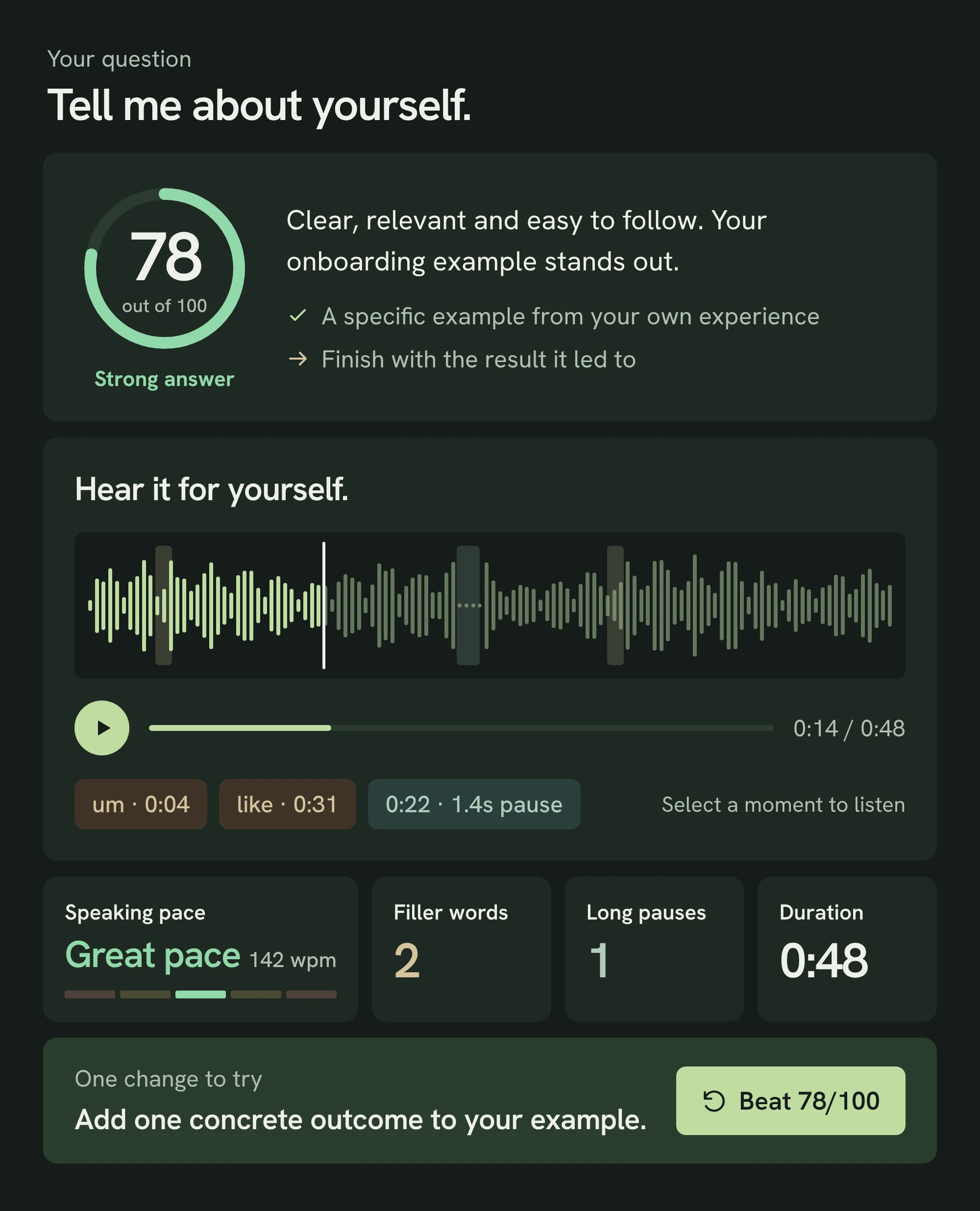
- Filler words: notice repeated “um”, “uh” or “you know” that interrupt your point. Try a brief pause instead. DontBlank can count words such as “like” even when they are meaningful, so listen before deciding to change them.
- Pacing: check your words per minute alongside the recording. If an important explanation sounds rushed, shorten the setup and give that point more space. There is no single pace that suits every answer.
- Pauses: use short silences to separate ideas and gather your thoughts. Review longer gaps to see whether you lost your place; a pause is not automatically a mistake.
- Clarity: answer the question in your opening sentence, explain unfamiliar details simply and finish with the outcome. Remove repeated points before adding more detail.
Can AI help you practise?
Yes. DontBlank gives you a transcript, speaking metrics and coaching on relevance, structure and examples, then suggests one change for your next take. You can jump straight to each filler word or pause in your recording to hear the context behind the numbers.
It works with English audio only and does not analyse vocal tone, pitch or volume. AI feedback and transcription can make mistakes; use your own judgement.
Frequently asked questions
How much preparation time do I get for each HireVue question?
Preparation time and response limits depend on the interview. Read your invitation and the instructions shown before you start. Practise planning a short outline within the time you are given rather than assuming a timing rule from someone else’s interview.
How long should my answers be?
Follow the response limit shown in your interview. Make your point, support it with one relevant example and close without repeating yourself; you do not need to fill every second.
Can I retake a HireVue answer?
Do not assume that you can. The interview’s settings and instructions determine whether another attempt is available. Practising another take in DontBlank does not mean you will be able to retry in the actual interview.
How should I prepare before starting the interview?
Research the role and employer, prepare a few genuine examples and rehearse them aloud. Check your microphone, camera, connection, lighting and surroundings using the platform’s instructions. Use any practice options offered in your invitation and leave time to read the instructions carefully.
Does DontBlank record video?
No. DontBlank records audio through your browser’s microphone. If your interview requires video, also rehearse separately on camera: DontBlank does not assess camera presence, eye contact or body language.
Is DontBlank free, and do I need an account?
DontBlank is free to use. You can get AI feedback on up to three answers a day without an account. Create a free account to save your feedback, practise without a daily limit, generate questions from your CV and job description and keep your interviews.
Should I memorise my answers?
Prepare key points and practise explaining your experience in different words. Memorising a full script can make it harder to adapt to a different question.
Is DontBlank an official HireVue simulator?
No. DontBlank is an independent audio practice tool, not a HireVue simulator or official HireVue product. It is not affiliated with HireVue or any employer, and its feedback cannot predict an employer’s assessment or interview outcome.
Further reading
Check your interview invitation for the instructions that apply to you.
Now say it out loud.
Use your own example. Record a first take, listen back and choose one thing to make clearer.